Radarbot: Radar Detector, GPS
- 4.1
- Rating
- 50.00M
- Installs
- Free
- Price
 Analysis by App-foxy
I tried Radarbot: Radar Detector, GPS as a driving companion rather than treating it like a second-rate replacement for a full navigation app. That distinction matters. Its job is to keep speed-camera awareness close at hand while helping with routes, so the experience is more focused than a typical map application. I found it most useful on familiar roads where I already knew where I was going but wanted an extra layer of attention around speed limits and camera locations.
The app comes from Radarbot Company and sits in the Maps & Navigation category. It is free to install, rated for Everyone, and has been available since March 8, 2016. Its current audience is substantial: the store shows a 4.1 average from about 619 thousand ratings, with more than 50 million installs. Those figures do not automatically make it right for every driver, but they do suggest that this is an established tool rather than an experimental utility.
How Radarbot fits into everyday driving
My first impression was that Radarbot is built around a simple driving question: “What should I be aware of on this stretch of road?” Instead of asking the app to do everything, I would use it alongside normal navigation. That makes it particularly practical for commuting, unfamiliar urban routes, and longer trips where a missed speed change can be easy to overlook.
In-Depth Coverage of Radarbot: Radar Detector, GPS
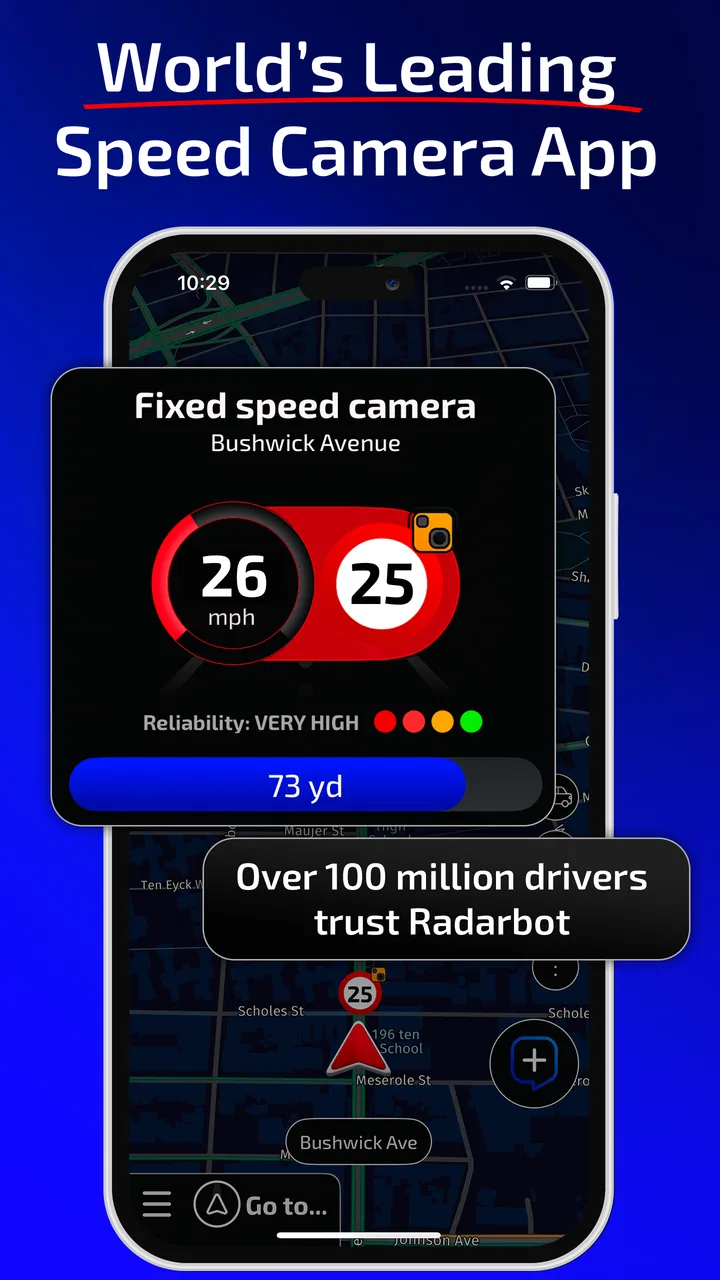
The interface is easier to understand when you think of it as a warning layer. A conventional navigation app concentrates on turns, arrival times, traffic, and destinations. Radarbot puts more attention on speedcam alerts and the driver’s immediate relationship with the road. That focus is its main reason to exist, and it also explains why someone looking for rich trip planning may find it limited compared with a larger navigation platform.
I would not treat any alert as permission to drive at a particular speed. Road signs, temporary restrictions, weather, traffic, and local regulations remain more important than an app notification. In practice, the best use is as a reminder to stay observant, not as a substitute for looking at the road. The store positions the service as legal and reliable, but responsible driving still requires judgement at every moment.
What the free access actually gives you
The clearest value point is that the app can be installed and used without an upfront purchase. That makes it easy to test on your normal commute before deciding whether it deserves a permanent place on your phone. For a driver who only occasionally wants speedcam awareness, free access may already cover the reason for installing it.
There are in-app purchases ranging from $1.99 to $79.99 per item. That is a wide span, so I would avoid assuming that every useful capability belongs to the same purchase or that the most expensive option is necessary. The sensible approach is to start with the free experience, identify the exact irritation you want to solve, and then inspect the purchase description carefully before paying.
This pricing structure creates two different value stories. The free version is appealing because the trial barrier is low. Paid value depends on how frequently you drive, how much you dislike interruptions or limitations, and whether the additional functions fit your routine. A person who drives once a month should be cautious about spending heavily on a specialized driving tool. Someone who spends hours on the road may judge the purchase differently, especially if the app becomes part of a consistent travel workflow.
Where the app earns its place
The strongest benefit is its narrow focus. Many navigation apps provide occasional camera information, but it can be buried among route instructions and traffic details. Radarbot makes that subject central. I found that useful when I was driving a route I knew well enough not to need turn-by-turn guidance, yet still wanted an extra prompt to pay attention near known camera areas.
It also makes sense for drivers who alternate between several navigation tools. You might prefer one app for directions, another for traffic, and Radarbot for speedcam awareness. That modular approach is more flexible than forcing one application to handle every part of a trip. The trade-off is that using multiple driving apps can make setup and attention management more complicated, so I would configure everything before moving rather than adjusting the phone at traffic lights.
A realistic example is a weekday journey across a city. I already know the route, but road conditions change, signs are easy to miss, and the same familiar road can feel different during rain or heavy traffic. In that situation, Radarbot is useful as a quiet reminder to check my speed and remain alert. It does not replace the road signs or my judgement; it supports a habit I should already have.
You May Also Like

 AliExpress - Shopping App
AliExpress Makes Global Shopping Feel Personal, but Shoppers Bear the Risk
AliExpress turns a global marketplace into a pocket-sized discovery engine. Its reach is useful, its shopping loop compelling, and its trade-offs easy to miss.

 Lords Mobile: Kingdom Wars
Lords Mobile Is a Kingdom-Building Routine, Not a Quick Match
A case-by-case verdict on the building, battles, device demands, and social commitments that make Lords Mobile rewarding for some players and exhausting for others.

 PDF Scanner app - TapScanner
TapScanner Makes Paperwork Easier to Capture, Check, and Share
TapScanner makes scanning with a phone feel less like a rescue operation and more like a dependable step in getting work done. Its capture tools are useful, though not flawless.

 Block Blast!
Block Blast! Shows How Much a Puzzle Game Can Leave Out
A quiet grid game shows why puzzle players increasingly value instant clarity, repeatable skill and low-pressure play—and where the genre still needs to catch up.

 Family Space
Family Space Review: A Shared Routine That Makes Family Life Easier
A parenting app earns its place not by adding more noise, but by making everyday coordination easier. Family Space gets that balance mostly right.

 1Weather Forecasts & Radar
1Weather Forecasts & Radar Makes the Daily Check Worthwhile
A good forecast does more than predict rain. This week's pick turns changing conditions into a clear, practical reason to check before you step outside.
More From Our News Desk
View All News


Practical habits that improve the experience
One useful habit is to test the app on a short, familiar drive before relying on it during a holiday or long-distance trip. That lets you learn how its alerts fit your attention without the pressure of an unfamiliar road. If the notifications feel distracting, that is important information: a warning tool is not helpful when it competes with safe observation.
A second tip is to treat route planning and alert awareness as separate tasks. Set the destination and preferred navigation arrangement before leaving, then use Radarbot as the supplementary layer it is designed to be. This reduces the temptation to interact with the screen while driving and helps you notice whether the app genuinely adds value beside your usual map.
A third, less obvious trade-off is that familiarity with a route can make an alert app more useful, not less. On a completely unknown road, you are already processing signs, junctions, lane choices, and traffic. On a regular commute, the extra awareness layer can fit more naturally because the route itself demands less mental effort. That does not mean familiar roads are automatically safe; it means the app’s focused role may be easier to use responsibly there.
I would also review my expectations after several drives rather than judging the app from one alert. A useful warning should support calmer, more consistent driving. If it creates uncertainty, repeated interruptions, or a false sense of security, the right response is to change how I use it or stop using it, not to assume that more alerts are always better.
Where Radarbot differs from ordinary navigation apps
Google Maps, Apple Maps, and other broad navigation services are usually better choices when the main task is finding a destination efficiently. Their strengths are route choices, places, traffic context, and integration with everyday travel. Radarbot is more specialized. Its appeal comes from giving speedcam awareness a more prominent role instead of treating it as one small part of a much larger map experience.
That specialization can be a benefit for drivers who already have a preferred navigation app. It can also be unnecessary duplication. If your current map app already offers the alerts you need, adding another application may bring more complexity than value. I would choose Radarbot when its focused approach solves a real gap, not simply because having more driving tools sounds reassuring.
The difference is also about attention. A full navigation app may guide every turn, while Radarbot is more relevant when the route itself is not the problem. For a delivery driver, frequent road traveler, or commuter who covers recurring routes, that distinction can make sense. For someone who mainly needs directions to occasional appointments, a standard map app may be enough.
Limitations I would take seriously
The app cannot make an inaccurate or changing road situation safe by itself. Camera databases and alerts should never be treated as complete coverage of every enforcement point or temporary restriction. I would continue reading signs and obeying the posted limit even if Radarbot says nothing. The app’s most responsible role is prompting awareness, not confirming that a road is free of risk.
There is also a possible distraction trade-off. Any phone-based driving aid can become counterproductive if the driver keeps looking down, changing settings, or comparing screens. Radarbot is best prepared before the car moves, with the phone positioned legally and safely. If you need to interact with it repeatedly during a journey, the setup is not working for you.
The purchase range may create uncertainty for budget-conscious users. Free installation is attractive, but the presence of several paid items means I would read each option rather than assuming the first upgrade is the only one or the best one. The app can be worthwhile without turning every driver into a subscriber or premium customer, but the value calculation is personal and depends heavily on driving frequency.
Another limitation is that specialization can feel narrow. If you expect one application to provide comprehensive navigation, traffic intelligence, destination search, and camera awareness with equal depth, Radarbot may not be the ideal single choice. Its identity is clearest when paired with a broader map tool or used on routes where the driver already knows the way.
Who is likely to get the most value
I would recommend trying it first to frequent drivers, commuters, and people who regularly travel through unfamiliar areas but already have a preferred navigation system. The free entry point makes that test relatively straightforward. Drivers who want a dedicated focus on speedcam alerts may appreciate the separation from a general-purpose map.
It can also suit someone who wants a more deliberate driving routine. Used correctly, the app can become part of a pre-drive checklist: set the route, confirm the phone is mounted safely, start the relevant tools, and then concentrate on signs and traffic. That workflow is more valuable than simply installing the app and expecting it to prevent mistakes.
I would be more cautious about recommending it to occasional drivers, people who dislike using multiple apps, or anyone who finds phone alerts distracting. If your existing navigation service already covers your needs and you rarely drive, Radarbot may add little. Likewise, if you are looking for a complete navigation replacement rather than a specialized companion, a broader map application is likely the better starting point.
My verdict on installing or paying
My honest recommendation is to install Radarbot if speedcam awareness is a specific concern and you want to test a dedicated tool without an upfront cost. The free availability makes the decision low-risk at the beginning, while the established user base and long presence in the category give it credibility as a mature option.
I would not pay automatically. First, I would use the free experience across several ordinary drives and compare it with the alerts already available in my usual navigation app. If Radarbot fits naturally into my routine and solves a problem I actually encounter, a paid item may be reasonable. If I rarely drive or the free setup feels redundant, keeping the free version—or skipping it—makes more sense than buying for reassurance alone.
Overall, Radarbot is best understood as a focused driving companion, not a magic shield against fines and not necessarily the only map app you need. Its value comes from making speedcam awareness more visible while leaving route planning to the tool you trust most. For me, the key decision is whether that focused layer improves attention without becoming another distraction. If the answer is yes, the free starting point is compelling; if the answer is no, a familiar all-purpose navigation app is probably the cleaner choice.
FAQs for Radarbot: Radar Detector, GPS
01What is Radarbot and how does it work?
Radarbot is a radar detection app for Android and iOS that alerts drivers to speed cameras, traffic alerts, and police radars using GPS technology. It combines real-time alerts with a pre-installed database of speed cameras, helping users avoid fines and drive safely. The app continuously updates its information to provide accurate alerts.
02Is Radarbot legal to use while driving?
The legality of using radar detection apps like Radarbot varies by country and region. In some areas, using such apps is completely legal, while in others it may be prohibited. It's important for users to check local laws regarding radar detectors and navigation apps before using Radarbot to ensure compliance.
03Does Radarbot require an internet connection to function?
Radarbot primarily uses GPS, which does not require an internet connection. However, for real-time alerts and updates, an internet connection is necessary. The app can still function offline using its pre-installed database, but for the most accurate and up-to-date information, a data connection is recommended.
04How accurate are the speed camera alerts on Radarbot?
Radarbot is known for its accurate alerts due to its extensive database and real-time updates from a community of users. While it strives for precision, users should still exercise caution and not solely rely on the app. Factors like GPS reception and network connectivity can affect accuracy, so staying attentive is key.
05Are there any in-app purchases or subscriptions in Radarbot?
Radarbot offers both free and premium versions. The free version includes basic features, while the premium version provides additional functionalities such as real-time alerts, access to all radar types, and ad-free usage. Users can choose to make a one-time purchase or opt for a subscription for ongoing premium benefits.
Pros
- Accurate radar detection in real-time.
- User-friendly interface for easy navigation.
- Customizable alerts for speed limits.
- Offline mode available for GPS navigation.
- Integration with music apps for seamless use.
Cons
- Some features require a premium subscription.
- Occasional false alerts in urban areas.
- Battery consumption can be high.
- Requires constant internet for updates.
- Limited language options for voice alerts.

Radarbot: Radar Detector, GPS
Gallery